With over half a million downloads in less than a year since its official release, the new Magento ecommerce platform is certainly taking the open source world by storm. I thought now might be a good time to go into the features we love most about Magento…so here they are – 10 things we love about Magento!
Multi-Site Functionality
A surprising number of our clients have more than one website. Often they are similar products targeted at different groups of customers, or related niche products that would sell better from a more specialised online store. The ability to run multiple sites from the same back-end, and to be able to manage orders and customers from the same place really makes life easier. Magento also allows you to generate reports based on individual sites, or the business as a whole, which I’m sure you’ll agree is very useful indeed!
Layered Navigation
Now that we have a few Magento projects under our belt I am starting to wonder what on earth we did before we had this very cool feature. It really streamlines navigation and improves the user experience. The ability to drill down through a product range using a series of useful attributes really makes browsing a site, especially one with a large product range, far more intuitive. Once you have a feature like this on your ecommerce website, you too will find yourself wondering how you ever lived without it!
Re-Ordering Based on a Previous Order
It may not be a huge feature, but I always feel it’s the little things that make life better. Call me sad, but being able to login to your account, find a previous order, and re-order it at the click of a button really gets me going! A huge part of ecommerce – and one that is often overlooked – is making life easier for repeat customers to keep them coming back time and time again. And this is one area where Magento flourishes!
One Page Checkout
I am always sceptical when I see “one page checkout” in the feature list of an ecommerce platform. Usually it means they’ve simply taken their 5 page checkout, and built it into one page with some fancy AJAX effects. Well you know, it’s still a 5-stage checkout process even if it is all in one page. I had a similar attitude to Magento, until I played with it some more. When ordering as a repeat customer I noticed vast improvements in the flow of the checkout process. I also love how each stage is added to the side bar as you progress, so you always have a clear summary of the information you have already entered.
Order Management
When it comes to ecommerce platforms, order management tends to be what separates the men from the boys. You can have the coolest front-end features but if the back-end can’t stand up to the day-to-day operations of a busy ecommerce website, administrative tasks can become something of a headache. Magento’s order management capabilities are by no means perfect, but it is certainly on the right tracks. All orders can be edited, part-shipped, credit memo’s can be applied, items can be backordered, notes can be added to orders; and so on and so forth. Also, batch management of orders is a real time-saver. You can print invoices, packing slips and credit memos (or all of the above), cancel and hold orders in bulk with the click of a button. Oh, and did we mention the great support for telephone orders, which can be easily added to the Magento system. But by far my favourite feature in terms of order management has got to be the new orders RSS feed. No more clogging up your mailbox with all those “new order” emails. Just subscribe via RSS. Genius!
Google Integration
Google has become a way of life for most of us. And for ecommerce website owners, Google Adwords and Analytics are essential tools for effective marketing and monitoring of their sites performance. Magento integrates seamlessly with Analytics and Adwords (for conversion tracking), and also has the facility to generate Google Sitemaps to help search engines index your website more effectively. There’s also complete integration with Google Checkout, because we all know Pay Pal sucks (it supports that too, if your so inclined!).
Reports Gallore
Magento’s reporting is thorough to say the least. Sales reports include breakdowns of shipping, tax, refunds and coupons. There’s also shopping cart statistics (abandoned carts, etc), product stats, customer stats, and reports detailing product reviews and search terms. All reports can be customised by date, and as previously mentioned can be refined to include only one Magento website or all of them (assuming you are running multiple sites). You can also export your reports to a CSV file, for use in Microsoft Excel.
Live Currency Update
Most of the lower-end ecommerce platforms that feature multiple currencies require you to manually update the exchange rate. Especially in today’s economic climate, with exchange rates varying daily, this is quite an annoying thing to have to do. Not with Magento. It links directly into WebServiceX and updates exchange rates automatically. As I said before, it’s the little things…
Promotions and Special Offers
I was a little overwhelmed by this at first, and, to be honest, I still am! Magento offers a wide range of rules that allow you to create special offers and discounts specific to either products or cart totals. Want to offer a 10% discount, but only on a certain brand? No problem! Want to make it so that the user can only get the discount if they spend over £20? Not a problem at all! Want to only allow a certain customer group to use the discount code? It’s all here baby! Although the rules setup takes a little getting your head around, it’s incredibly powerful and offers an endless selection of promotional options to offer to your customers.
It’s Open Source
Last but by no means least, the fact that Magento is available freely as an open source product is breathtaking. OSCommerce has for years dominated the open source ecommerce market, spawning tens of thousands of identical online stores, each one as ugly as the last. I love the fact that Magento is a high quality open source product that wipes the floor with OSCommerce. But what I also like is the fact it’s not aimed at beginners. It’s enterprise level, and while I’m sure we will still get a stream of very similar Magento websites, all based on the default theme, hopefully their mark on the web won’t be anywhere near as ghastly as that of other open source ecommerce solutions. But for established ecommerce businesses looking to take their site to the next level, Magento is by far the best open source product on the market and definitely worthy of your attention!

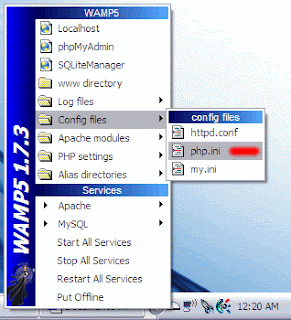
 Go ahead and install WampServer. I just installed mine to the root of the c: drive so it makes for easy access (For example, “c:\wamp”).